What is your
Personal Computer?
Explore the essential building blocks of modern computing — from the CPU that powers every calculation to the GPU that renders every pixel.
Explore Components
Explore the essential building blocks of modern computing — from the CPU that powers every calculation to the GPU that renders every pixel.
Explore Components
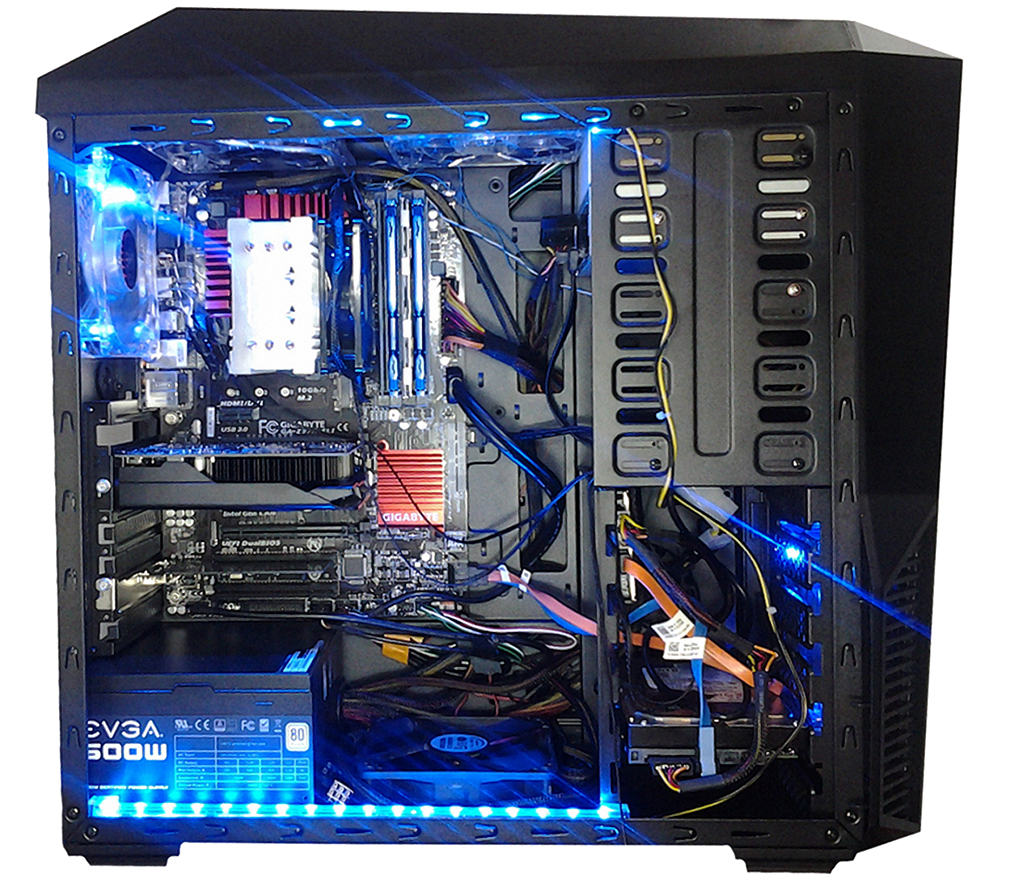
Hover over the dots on the image — or click a tab — to learn what each part does
 CPU
CPU RAM
RAM GPU
GPU PSU
PSU Motherboard
 Cables
 HDD NVMe SSD
 Optical
 Cooling
The CPU (Central Processing Unit) is the brain of the computer. It executes the instructions of every program — handling arithmetic, logical and input/output operations. The faster the processor, the more smoothly the entire system runs.
RAM (Random-Access Memory) stores the data your computer is actively working with. Unlike a hard drive, it allows data to be read and written extremely fast in any order. When you turn off your computer, RAM is cleared — so always save your work to disk.
The GPU (Graphics Processing Unit) is a specialised chip designed for fast image processing. While the CPU handles tasks one at a time, the GPU can process thousands simultaneously — making it essential for games, video playback and graphic design.
The PSU (Power Supply Unit) converts the mains AC voltage from the wall socket into the low DC voltages required by the computer's components. Modern units automatically adapt to the input voltage and deliver stable power to the entire system.
The motherboard is the main printed circuit board of the computer. It connects the CPU, RAM, GPU and storage together and handles communication between them. It also includes power management circuits and input/output interfaces.
Cables connect all components inside the PC, carrying both power and data. Tidy cable routing improves airflow inside the case and makes future upgrades easier. It is normal to add, move or remove cables throughout the life of the installation.
The HDD (Hard Disk Drive) stores data permanently on rapidly spinning magnetic platters. Data is retained after power-off and can be accessed in any order. HDDs offer large capacity at a low cost, but are slower and more sensitive to physical shock than an SSD.
An NVMe SSD is a modern storage device with no moving parts, using flash memory. It is many times faster than a traditional HDD — the system boots in seconds and applications open instantly. It is also silent and resistant to physical shock.
The optical drive reads and writes data on CD, DVD or Blu-ray discs using a laser beam. Most modern computers no longer include one — physical media has been replaced by internet downloads and cloud storage.
Components generate heat during operation that must be removed. Fans and heatsinks keep temperatures within safe limits, extending the lifespan of parts and preventing crashes caused by overheating.
Behind the scenes — manufacturing the components that power your computer
How a CPU Microchip is Made — Branch Education
How RAM is Made — V-Color Factory Tour (GamersNexus)
How a GPU is Made — Gigabyte Factory Tour (GamersNexus)
How a Motherboard is Made — GamersNexus Gigabyte Factory Tour
How a Hard Drive is Made — Inside the Factory
How NAND Flash & SSDs are Made — Branch Education
How a PSU is Made — Cooler Master Factory Tour (GamersNexus)
How PC Coolers & Heatsinks are Coated — Factory Tour (GamersNexus)
From Sand to Silicon — The Making of a Microchip (Intel)